Lightroom Classic Plugin for Mac

Publish to
Apple Photos

Your Lightroom edits go straight into Apple Photos — no exported files cluttering your Mac, no dragging and dropping. Just click Publish.

One-time purchase. Mac only.

Plugin installed in Lightroom's Plugin Manager
Drag in. Done.
Publish Services panel showing collections ready to publish
One click to publish.
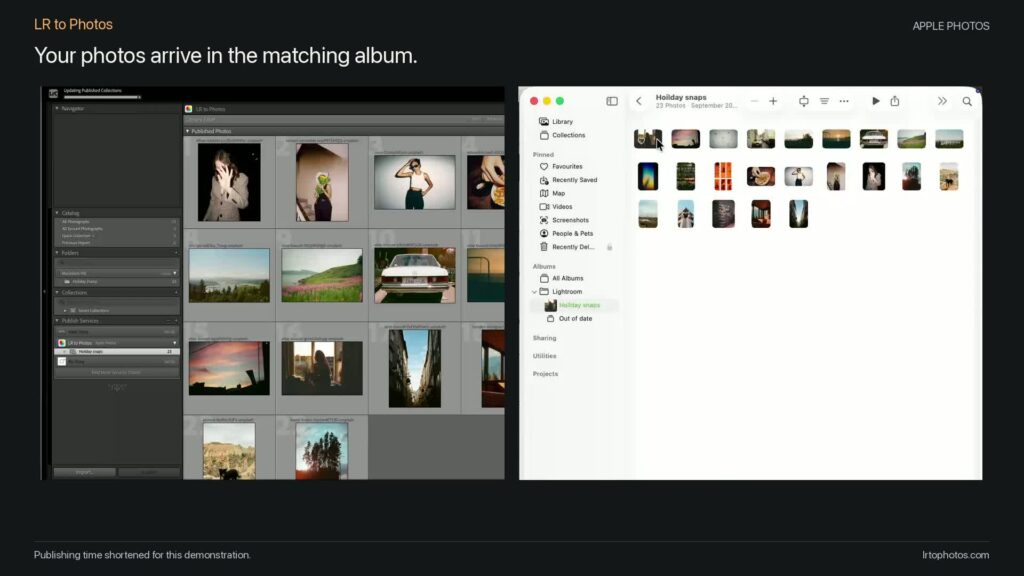
Photos appearing in Apple Photos organised into albums
Albums. Organised. Synced everywhere.

Three steps. That's it.

1

Drag into Lightroom

Drop the plugin into Lightroom's Plugin Manager. No terminal. No scripts. No dev tools.

2

Set up a Publish Service

Just like Flickr or SmugMug — choose your album settings and you're ready.

3

Hit Publish

Your photos land in Apple Photos, organised into albums that match your collections.

Features

What you get

🚫

No files on your Mac

Exported photos go straight into Apple Photos — they never land on your desktop or clog up a folder. Zero clutter.

📱

Ready to share

Photos land in Apple Photos and sync to your iPhone via iCloud. Post to Instagram, share to WhatsApp, AirDrop to clients — instantly.

📁

Albums from Lightroom

Your Lightroom collections become Apple Photos albums — automatically. Organise once, see it everywhere.

Saves you time

No more export, find file, import, organise. Hit Publish and it's done. One click instead of ten.

🎬

Photos and video

Publish both stills and video files. If Lightroom can export it, this plugin can publish it.

Zero setup

No Xcode. No Homebrew. No command line. Drag the plugin into Lightroom and you're done.

Built for photographers

You edit in Lightroom Classic. You live in the Apple ecosystem. But getting photos from one to the other means exporting to a folder, opening Photos, dragging files in, deleting the exports, and doing it all again next time.

LR to Photos kills that workflow dead. Wedding photographers sharing sneak peeks, hobbyists keeping their library in sync, anyone who wants their Lightroom edits on their phone without the faff — this is for you.

FAQ

Questions

Does this work on Windows?

No — Apple Photos is a macOS/iOS app, so the plugin is Mac only.

Do I need to install anything else?

No. Drag the plugin into Lightroom's Plugin Manager and you're done.

Which Lightroom does it work with?

Lightroom Classic — the desktop app with the catalog. Not the cloud-based Lightroom (Lr).

Will my photos sync to my iPhone?

If you have iCloud Photos turned on, yes. Anything in Apple Photos on your Mac syncs to all your devices.

Does it delete photos from Apple Photos?

No. If you remove a photo from Lightroom, it stays safe in Apple Photos. We never delete your photos.

Can I organise photos into albums?

Yes. By default, the plugin creates an Apple Photos album for each Lightroom collection. You can also send everything to one album.

Stop the export-import dance.

Get your Lightroom photos into Apple Photos in one click. One payment.

Get LR to Photos — £19